
Your files. Your storage. Your office.
Desktop downloads are ready. Files live on your own machine, no subscription to keep paying, no cloud account required.
v0.1.0 public beta · unsigned installer, your OS will ask you to confirm on first launch (steps in the download section) · Apache-2.0

Who it fits, and what gets in the way
Individuals and small teams who write documents, build spreadsheets and hand in presentations daily — especially anyone done with per-seat subscriptions.
Office subscriptions renew every year; stop paying and your own files stop opening
Everything defaults to someone else’s cloud, and company documents sit uneasily there
What you get
✓ Documents, spreadsheets and presentations in one suite, common formats working across them
✓ Files stored locally first, on your own computer
✓ Free and open source, no subscription
✓ Chinese-first interface, so starting takes no relearning
Your files. Your storage. Your office.
Tell us where it hurts first. Scoping and a written quote come before anything starts; looking costs nothing.
Or ask Leo, the assistant at the bottom right, first — get the questions clear before you write to us.
Introduction
Your files stay on your machines
Wenshu runs no cloud of its own. When we say your data never leaves your devices, we mean it literally: files are saved to the folder or drive you choose, and we have no server that could see your documents. To reach them from another device, point Wenshu at storage you already control — WebDAV (Nutstore, Nextcloud, Synology) or a synced folder from your system cloud drive. If two devices edit the same file, neither version overwrites the other; you get a conflict copy to reconcile yourself, and the losing version stays in a version history you can recover. Optional client-side encryption is available too, with a key derived from a passphrase only you know — and if you lose that passphrase, nobody can open the files. That warning sits right next to the switch, not in fine print.
Word and Excel files open as they are
DOCX, XLSX and PPTX are handled by our own file-format code, so files from colleagues open, edit and save back without a conversion detour. For the rare document with layout too complex for the built-in channel, a compatibility mode hands it to a locally installed LibreOffice instead — viewable and exportable to PDF, with nothing silently dropped along the way.
The small PDF jobs, without uploading anything
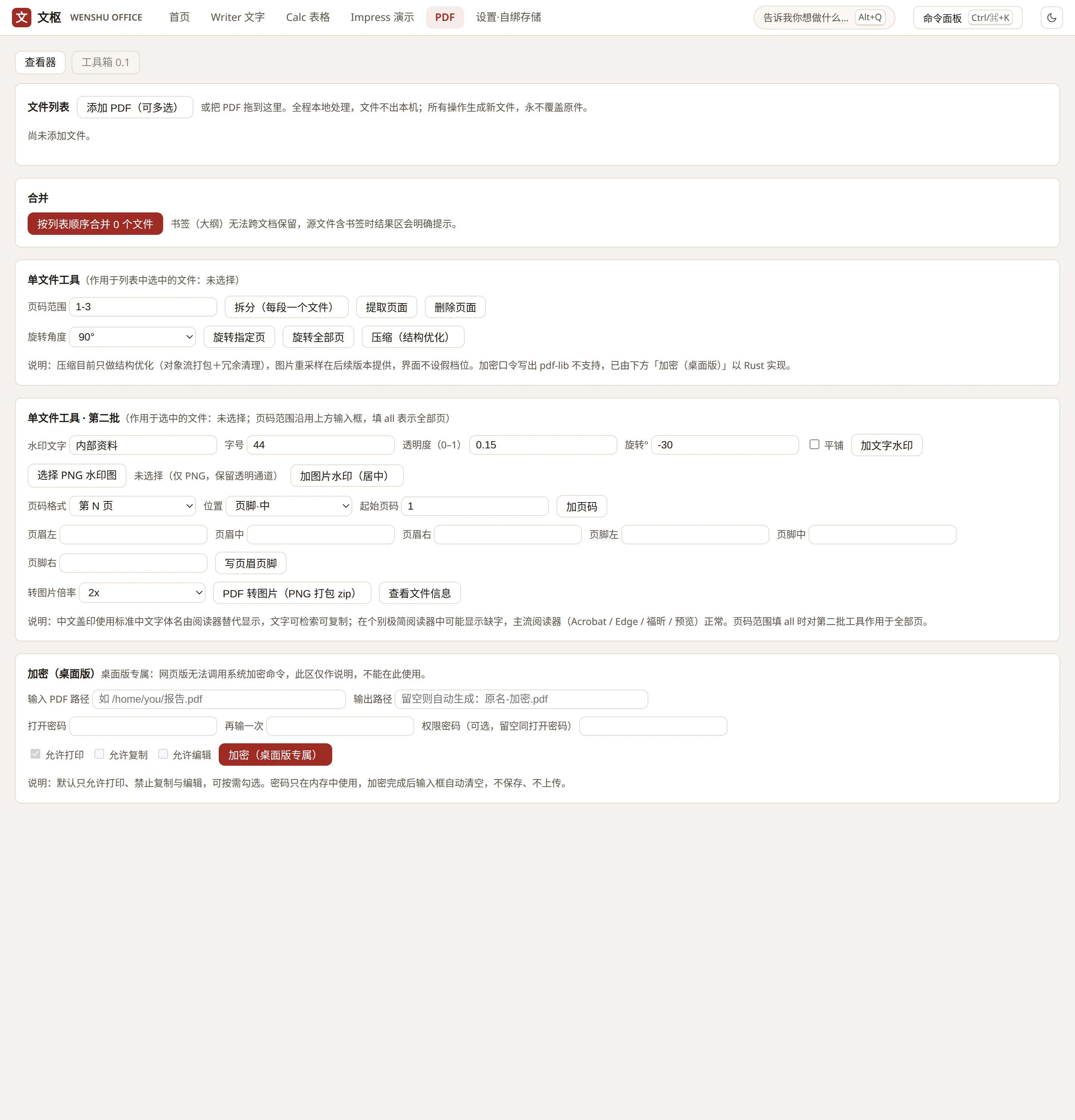
Merge, split, watermark, page numbers, export to images — the toolbox handles the chores people usually upload contracts to random websites for. Everything runs locally. Need to send a file out protected? AES-256 encryption with a password you set.
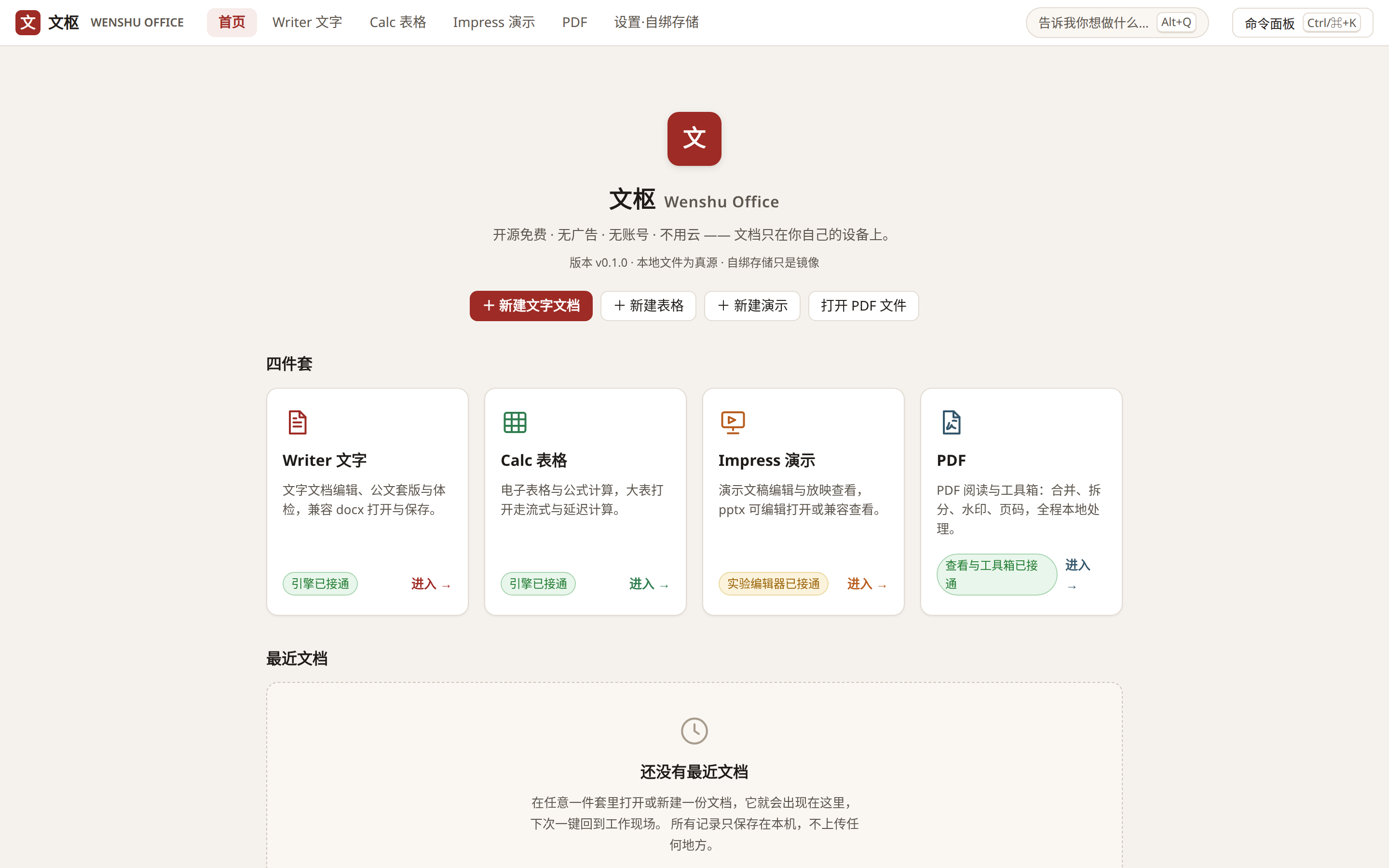
It works on the files you actually receive. A DOCX from a colleague opens, edits and saves back with its footnotes, comments and section footers intact. An XLSX from finance calculates locally, with a fast streaming path for hundred-thousand-row workbooks. A PPTX opens for editing, and complex decks can be rendered to PDF first when you only need to check the layout. The PDF chores — merge, split, watermark, page numbers, export to images, password encryption — all happen in the built-in toolbox, on your machine. For Chinese government documents there is a dedicated panel that applies the GB/T 9704-2012 format in one click and then runs a 28-rule check that points at the exact paragraph when something is off.
Wenshu is open source under Apache-2.0, free for personal and commercial use. No premium tier, no feature locks, no default telemetry — the only places your documents have ever been are your computer and the storage you bound yourself. The current release is v0.1.0, an unsigned public beta, so your OS will ask an extra question at install time. The rough edges are documented too: the slides module is young, charts in spreadsheets do not survive a round trip yet, and WebDAV has not been verified against every provider. If that trade-off works for you, download it and try. If not, head to the Issues in the GitHub download repository and watch it grow step by step.
Features
✓ Writer: DOCX editing, official-document formatting and checking tools, compatibility mode for complex files
✓ Calc: XLSX editing and formulas, streaming open for large workbooks, pivot tables preserved on round trip
✓ Impress (experimental): PPTX open and edit; opening external decks for editing is not yet stable — use compatibility viewing for complex decks
✓ PDF Toolbox: reading, merge, split, extract/delete pages, rotate, watermarks, page numbers, export to images, AES-256 encryption
✓ Bring your own storage: local folder / system cloud-drive folder / WebDAV (Nutstore, Nextcloud, Synology)
✓ Conflict-safe sync: simultaneous edits produce a conflict copy, never an overwrite; version history keeps the latest 30 versions per file
✓ Optional client-side encryption, passphrase-derived key, applied before files reach your storage
Screenshots
Free download — no email required
v0.1.0 · 64-bit / macOS universal · exe ~6.2 MB, dmg ~14.4 MB (an MSI build is on the release page too)
This is an unsigned public beta, so your OS will stop it once on first launch: on Windows choose “More info → Run anyway” — it only asks once; on macOS right-click the app and choose “Open”, or allow it under System Settings → Privacy & Security → “Open Anyway”.
The only official download channels are this page and the Wenshu-Releases repository on GitHub, where SHA-256 checksums are published for every build. Wenshu is released under Apache-2.0, free for personal and commercial use — no premium tier, no feature locks.
See all installers and SHA-256 checksums on the GitHub release page →
Help & user guide
Installing for the first time, connecting your storage, resolving a conflict, turning on encryption — the guide walks through each step.
Boundaries
Not included
- No cloud collaboration: local-first is the point of this product
- No promise of pixel-perfect fidelity with any one brand’s complex layouts — check complex files after opening
What we need from you
- A computer of your own; versions are listed on the download page
- Checksums are published on the download page — verify before installing
How engagement and quoting work
Free and open source; help yourself. Teams wanting bulk deployment, training or migration help can scope it through the contact page.
Questions on this page
How is this product priced?
By the model stated on this page: free means free to use; subscription and one-off products are priced against your situation at enquiry, written down before anything is activated — nothing is charged first.
Who do I contact if something breaks?
Open a ticket at the support center. First response within 4 working hours. For urgent problems that block your work, mark "URGENT" in the title.
Is it really free?
The software is. Human services around it — deployment, training, migration — are separate and only if you ask.
Will my existing documents open?
Common formats interchange fine. For heavily formatted files, open and check before relying on them.
How do we start?
Pick your version on the download page, verify the checksum, install, and try it on a low-stakes file first.
Related
KINGAI OS
A Linux product family spanning Desktop, Server, Edge and AI Workstation editions.
AI Staff
AI staff hired by role: support, sales assistance and operations, taking the repetitive work off your team.
Security Checkup
A website security report in plain language, findings ranked by severity so the urgent ones get fixed first.
Your files. Your storage. Your office.
Tell us where it hurts first. Scoping and a written quote come before anything starts; looking costs nothing.
Or ask Leo, the assistant at the bottom right, first — get the questions clear before you write to us.